2013年12月27日星期五

Holiday Sale: Heavy Discounts for ArcSoft Portrait+ and More

Hello guys, WISH HAPPY AND HEALTHY HOLIDAYS TO YOU AND YOUR FAMILY! 
New Year is coming soon filled with best wishes and nice dreams. To welcome the year of 2014, and to express our gratitude, ArcSoft has provided special offers for you guys. 

Photography Bundle – 52% OFF
This bundle includes five photo editing software: Portrait+, Panorama Maker, PhotoStudio, Perfect365 and Group Photo. At the price of a copy of Portrait+ $249.99, you can get all these applications! For more details, please click here.
ArcSoft Special Offers


ArcSoft Portrait+: The First Auto Retoucher for Portraits – 60% OFF
With precise auto detection of facial features and visible skin, fast batch-processing and one-click presets, Portrait+ helps save time, reduce costs and make stunning portraits. It also has a Photoshop plug-in version to make it perfectly integrated into your current workflow.

Now you can get this awesome program, the best companion for portrait photographers, at $98.99 with coupon code Portrait45. That’s 60% OFF the original price!!! A deeper discount we offer than the one on our website, exclusively for you lucky guys who see this post. 
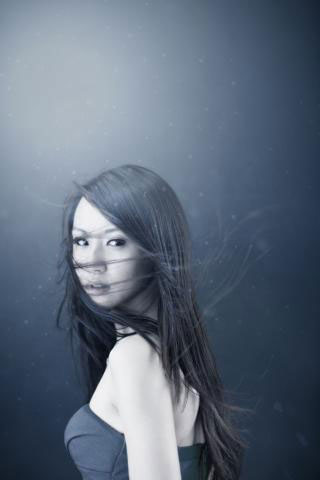
Retouched by ArcSoft Portrait+


2013年2月19日星期二

How to shoot backlit


Backlight photos are of great artistic expression, and welcomed by many professional and amateur photographers. To take a good backlight shoot, it is of great importance to control over light. Concerned with sunlight, it is changing all the time especially the conversion of light intensity and angle. Every tiny difference changes the mood of a picture. Let’s find easy ways to get your desirable backlight photos.

Today, we focus on achieving backlit photos with the natural sunlight. To get a full grasp, we divide it in to two sections.

Section 1: Sunrise and sunset hours.

(Taken by KettyRao)
The best light is the golden "liquid light" of the early morning and late afternoon. The weak light intensity is conducive to backlit photo shooting, particularly those small staffs. A huge benefit to having portraits backlit with the sun is that lovely rim lighting--where the edges of your model(s) are outlined by a thin thread of light. You need to pay attention to the fast variation of sunlight at this period. Splendid senses gone soon, thus the preparation before shooting is far more important.

Section 2: Midday hours.

 (Taken by Tyler and Katie)
If it is a good day, you will find strong light intensity. It is easy to take backlit photos with vignette blur, strongly decreasing the photo expression. Try to avoid taking the backlit photos with the direct sunlight at this time. If you do have to shoot with a high sun, a day with broken cumulus clouds can be ideal. Those clouds can act as a giant soft box and give you wonderful light without harsh shadows. Take full advantage of the reflected light from other objects.
  

2013年2月17日星期日

ArcSoft professional portrait retouching software Portrait+ 2.0 is released


Portrait+ is an Auto Retoucher for portrait photos, featuring natural skin smoothing techniques, fast batch-processing, and retouching large numbers of portraits precisely and quickly.

Recently ArcSoft released an upgraded version of Portrait+2.0. Enhanced with powerful functions and a streamlined UI, it definitely will bring a fresh and powerful user experience to you.


l Allow tight integration with your Lightroom workflow to simplify the process of portrait retouching. Support for Adobe Photoshop Lightroom 3.0 or later is available
l Intelligent blemish removal tool helps you eliminate skin problems with a simple click
l Selective brushers add or remove skin-smoothing areas easily
l Advanced full body skin detection to detect and soften your skin automatically
l New soften skin algorithm provides more smoothness and more scale
l Refined preset and custom styles make the editing process easy and accurate

When you have to deal with numerous photos within a limited time, Portrait+2.0 helps you handle the tricky task easily with high quality results guaranteed. Whether you use it to soften skin, improve complexion or put on makeup, Portrait+ will meet all your retouching needs.

Try it immediately to remove your blemishes and make your portraits beauty.

If you are interested in Portrait+2.0 and want to download a free trial version, please visit: http://www.arcsoft.com/portraitplus/


2013年1月23日星期三

The International Street Photography Awards 2013 Are Now Open

Photo by Vivian Maiet, 1959 - Courtesy of John Maloof

The International Street Photography Awards 2013 are now open.

In 2013, for the third year running, the awards return, searching for the best street photography from around the globe.

After the success of the International and Student Street Photography Awards in 2011 and 2012, these prestigious awards return for a third year running in 2013, but they are now being run by the exciting new home of photography: Fotoura.

The past two years saw entries from 113 countries, and allowed street photographers from across the globe the chance to have their work seen on an international platform.

The 2013 Fotoura International Street Photography Awards will include Open and Student categories, and will of course be open to photographers all over the world. The winners and a selection of the best entries to this competition will be shown in an exhibition in central London in Spring 2013.

There are a few differences to this year's contest including a theme which is HOMETOWN (read more about the theme on the Fotoura website.), and some exciting ways for entrants to have their photos added to the Fotoura App, which will enable people from around the world to browse images and vote for their favorites.

In doing this, Fotoura hopes to not only continue to celebrate the tradition of street photography and engage more practitioners, but also to build a huge archive of extraordinary moments spotted in people's daily life, all over the world.

The first prize winner will receive £2000 cash, an exhibition of their work in London, a camera and £100 book publishing voucher. Second and third prizes will also be awarded, as well as ten runners up.

Entrants can choose whether they want an image from their entry to be added to the Fotoura App, and included in a global public vote, which will result in a winner for every single country! These country winners will also be exhibited in the London exhibition alongside the officially judged first, second and third prize winners and runners up.

The entry price is £30, and £15 for students. (All entrants to the International Street Photography Awards receive a £30 voucher to print their own photo-book at Blurb.com.)

The deadline is 12 February 2013 (6pm GMT).

For more information, visit the Fotoura website.

2013年1月21日星期一

Arcsoft Low Light NR Software Giveaway

Win one of the most advanced noise reduction programs out there!

Posted on 01-19-2013 in Pentax Events, PentaxForum.com

ArcSoft (a company specializing in post-processing software) has recently announced a new noise-reduction program called low-light NR, which introduces a feature called multi-frame noise reduction on top of conventional noise reduction algorithms. They are giving away 5 free copies of this software through an exclusive PentaxForums.com giveaway, and it only takes a few minutes to enter, so we highly encourage you to do so.  Details on the giveaway are found here.

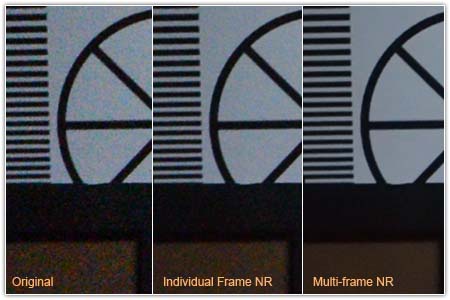
Below is an example of how this new noise reduction technology outperforms traditional algorithms:
As you can see, noise is obliterated and details are retained almost perfectly.

The reason this works so well is that multi-frame NR collects pixel data from multiple consecutive photos of the same subject. Such photos can be obtained by shooting in burst mode or using exposure compensation. Since the noise patterns will differ slightly from photo to photo, the software is able to recover detail lost in your original photo by looking at the other frames.

Our Low Light NR giveaway raffle will close in 3 weeks, so enter today if you're interested in winning a free copy of this $80 software! No purchase necessary. You can also try a free trial of the software while you wait for the winners to be announced.

In case you weren't aware, ArcSoft is also the developer of some of the software that Pentax bundles with their cameras! If you are interested in any ArcSoft products, the coupon code PENTAXARCSOFT will save you 25%.


2013年1月16日星期三

How to Shoot Great Candid Photos (II)


We’ve talked about 5 tips of getting great candid shots, today I’d like to share further tips on this topic. It’s really nice to learn how pro photographers get stunning candid photos from their photo works and word descriptions. Hope today’s tips could give you more inspiration of shooting better candid photography.


1. Photograph People Doing Things
Images of people doing things tend to be much more interesting than people sitting passively doing nothing. For one your subject will be focused upon something which adds energy to a photo (and takes their focus off you) but it also puts them in context and adds an element of story to your image. Timing is everything in Candid shots so wait until they are distracted from you and fully focused upon what they are doing or who they are with and you’ll inject a feeling into your shots of them being unaware and that the viewer of your image is looking on unseen.

2. Photograph People with People
Something very interesting happens when you photograph more than one person in an image at a time – it introduces relationship into the shot. Even if the two (or more) people are not really interacting in the shot it can add depth and a sense of story into the viewing of the image. Of course ideally in candid shots you’d like some interaction between your subjects as that will add emotion into the shot also as we the viewer observe how the people are acting.

3. Shoot from the Hip
If your subject is aware that you’re there and that you have your camera out they might tense up or act a little unnaturally as they see you raising your camera to the eye. The beauty of digital cameras is that it doesn’t cost you anything to take lots of shots and it can be well worth shooting without raising your camera. To do this most effectively you might want to set your lens to a wider angle setting to make up for any aiming problems you might have.

4. Mix up Your Perspective
The other beauty of shooting from the hip is that it gives you a slightly different perspective to take the shot from (i.e. shooting from 3 feet height instead of 6). This adds to the candid nature of the shots. In fact sometimes it’s the slightly crooked, slightly out of focus or poorly composed shots taken from this type of angle that ends up looking the best because they come across as quite random. Of course you can add all these new perspectives to your shots without shooting from the hip. Crouch down, get up high, frame your shots on an angle, zoom in close and then quickly zoom out to a wide angle, break the rules of composition etc. and you will add a new perspective to your shots that can mean they look fresh and surprising.

5. Frame Images with Foreground Elements
A trick that I often use in candid shots is to purposely include something in the foreground of the shot to make it look as though I’m hiding behind it. You might do this with by shooting over someone’s shoulder, by including a little of a tree branch or the frame of a doorway.

6. Take Posed Shots into Candid Territory
One of my favorite times to shoot candid shots is when other people are taking formal ones. This is because everyone in the shot is focused on the one element (the other photographer) – but it’s not you. If the main photographer has posed the happy couple of the day or their bridal partly look for a different angle to them to take a shot of the same subject. Often if you take a few steps to the side and shoot from almost a profile position you can get great shots. Also zooming in to take shots of just one or two of the people in a larger group at these times can work well. Also try zooming right out to take a shot of the photographer and their subject all in one. If you’re the only photographer and you’re taking formal shots a great technique is to take your posed shot and then continue to shoot after everyone thinks you’ve finished. It’s often the shots just after the posed one that are the best as people relax and look at each other.

2013年1月15日星期二

How to Shoot Great Candid Photos (I)

Candid styles of photography are increasingly becoming popular both in general day to day photography but also in formal photographic situations. Last time I was asked to photograph a wedding the couple actually hired me purely to take paparazzi style shows of them and their guests throughout the day. They had another photographer for the formal shots and gave me the brief of getting a behind the scenes look of the day.

The results, when they put together my shots with the formal ones were a wonderful blend of photos that told a fuller story than if they’d gone for one or the other.

Below are a number of tips to help photographers improve their ‘candid’ photography. Please note that these tips are not about taking sneaky, voyeuristic or true paparazzi shots (i.e. photographing people without their permission) but rather about how to add a more candid feel to the shots you take of people that you know.

1. Take Your Camera Everywhere
Probably the best way to take spontaneous photographs is to always be ready to do so. I have a DSLR which I take out when I’m on a shoot but between shoots like to carry with a quality point and shoot camera that I can whip out at a moments notice to capture the many opportunities for a good photo that life presents us with. Taking your camera with you everywhere also helps people to be more at ease with you taking their photo. I find that my friends and family just expect me to have my camera out so when I do fire it up it’s not a signal to them to pose but it’s a normal part of our interaction – this means that they are relaxed and the photos are natural.

2. Use a Long Zoom
Obviously the further you are away from your subject the less likely they will be to know that you’re photographing them and the more natural and relaxed they’ll act. Using a telephoto lens or long zoom enables you to shoot from outside their personal space but keep the feeling of intimacy in the shot you’re taking.

3. Kill the Flash
Perhaps the most obvious way that you can signal to another person that you’re photographing them is to use a flash. There’s nothing like a blinding flash of light in the eyes to kill a moment. If possible (and it’s not always) attempt to photograph without the flash if you’re aiming for candid shots. When in lower light situations increase your ISO setting, use a faster lens, open up your aperture or if your camera has a ‘natural light mode’, turn it on. Hopefully one or a combination of these approaches will help you blend into the background a little more.

4. Shoot Lots
I've written about this before on this site but when you shoot multiple images quickly of a person you can sometimes get some surprising and spontaneous shots that you’d have never gotten if you shot just one. Switch your camera to continuous shooting mode and shoot in bursts of images and in doing so you’ll increase your chances of that perfect shot.

5. Position Yourself Strategically
While Candid Photography is about capturing the spontaneity of a moment and getting that perfect shot at the right split second of time I find that if you think ahead and anticipate what is about to unfold in front of you that you can greatly increase the chances of getting some great shots. So at a wedding get to the church early (or even go to the rehearsal) and think about what will happen during the ceremony and where will be best for you to stand to capture each moment. Which way will people be facing? What will they be doing? What will the light be like? Thinking through these issues will save you having to run around repositioning yourself when you should be shooting images – it’ll also mean you take a whole heap less shots of the back of people’s heads!
re-posted from DPS

2013年1月8日星期二

Give Your Subject Space to Look Into


Reposted from Darren Rowse, DPS

As a rule (and we all know that they are made to be broken) if the person (and it works with animals too) you are photographing is looking in one direction or even if their head is pointing in that direction it is best to place them on the opposite side of the frame.

You’ll see it best illustrated in the images on this page – in each case the person is not being photographed head on but have their head pointing either to the left or the right. As a result the photographer has given them some space on the side that they are pointing/looking.

The reason for this is that when a person views an image with a person looking in one direction or the other their eyes also are drawn in that direction. In a sense you’re giving the subject of your image some space to look into and in doing so create a natural way for the photos viewer to flow into the photo also.


Even just a slight turn of the head can be effectively framed using this technique. 

Breaking the Rule

Of course breaking this rule produces interesting shots (in some cases more so). They might not be as aesthetically pleasing on some levels and could leave those viewing your images feeling a little on edge but this type of reaction to photos can be quite powerful also.


2013年1月6日星期日

ArcSoft Released Low Light NR, the Innovative Image Noise Reduction Application Based on Cutting-edge Multiple Frame NR Technology (MFNR)

The most image details recover, gain the unexpected.


Low Light NR from ArcSoft, a world leader in imaging technologies and applications, combines individual frames to produce one high-resolution image, acquiring more graphic information than it is available from a single photograph. It greatly reduces the visible image noise while improving the image quality efficiently by processing sets of photographs taken in burst mode, offering users amazing low noise images.

So far, the new and sophisticated MFNR technology has only been available on a few newly released digital cameras. The amazing result has won general admiration from many professional photographers. Based on it, ArcSoft developed its first low light noise reduction application Low Light NR. It will offer users unexpected results during post-production.

Low Light NR features mainly include:
  • Advanced Multiple Frame NR technology helps reduce noise while acquiring more details from sets of photographs taken in burst mode
  • Accurately and efficiently remove noise from Canon 5D Mark III/Nikon D600/Nikon D3S etc.
  • The fastest processing speed based on cutting edge algorithm
  • Supports a wide range of images from mobile phone cameras to high-end DSLR cameras
  • Advanced editing tools and sharing, like controlling noise reduction level, adjusting white balance, saturation & contrast etc., cropping and straightening photos, and share onto SNS

ArcSoft Low Light NR is the companion  that both professional and amateur photographers must posses and the wonderful post processing tool that they should have a try. 

For more information about Low Light NR and to download a free trial version, please visit our  webpage: http://www.arcsoft.com/lowlightnr/ .

About ArcSoft
ArcSoft, Inc. is an industry leading software developer of imaging and multimedia technologies and applications across desktop and embedded platforms. Working closely with major OEM manufacturers, ArcSoft offers a full line of imaging and video solutions that enhance the features, performance, and user experience of mobile phones, digital cameras, personal computers, tablets, and consumer electronics devices. For further details, visit www.arcsoft.com. 

2013年1月4日星期五

ArcSoft New Year’s Sale 2013: Heavy Discounts for Bundles & Multimedia Products


HAPPY NEW YEAR EVERYONE! It is 2013 now, a year filled with best wishes and nice dreams. To celebrate the dawn of a new year, ArcSoft Inc. has provided special offers again after Christmas Sale. You can get kinds of ArcSoft multimedia products, like photo editor, media player, media converter and much more, with heavy discounts.

New Year Fun Bundle: Big Saving, 50% OFF
  • ArcSoft Perfect365 – Spice up your portrait photos with one-click virtual makeup templates and make your portraits perfectly;
  • ArcSoft PhotoStudio – A powerful and feature-rich image editor;
  • ArcSoft Panorama Maker - Create perfect panorama with your photos and videos.

All above products of this bundle have Windows version & Mac version.

In addition, everyone can get 10% OFF for all download products (exclusive bundles), just enter coupon code SAVE10PROMO.

Here we’d like to recommend one of our flagship products – Portrait+, the professional portrait retouching software, specially designed for pro photographers who need to spend a lot of time in post-production. Portrait+ is able to batch-process dozens of portrait photos in a minute with all details preserved. With ArcSoft’s proprietary facial detection technology, handy fine-tuning controls and over 20 pre-set retouching styles, Portrait+ can help simplify the complicated process of portrait retouching. It also has a Photoshop plug-in version to make it perfectly integrated into your current workflow.

To know more about this New Year Sale, please click here.

2012年12月27日星期四

FEP European Professional Photographer Of The Year Awards 2012

News from ePhotozine, posted on Dec. 23, 2012

The winners of the FEP European Professional Photographer Of The Year Awards 2012 have now been announced. Herewith the list of the Golden, Silver and Bronze Cameras 2012 and the finalists:


COMMERCIAL
  • Jose Luis Guardia Peinado, Spain, FEP European Commercial Golden Camera 2012
  • Gerry O’Leary, Ireland, FEP European Commercial Silver Camera 2012
  • Daan Moreels, Belgium, FEP European Commercial Bronze Camera 2012
Finalists
  • Antonio Martín Ballesteros, Spain
  • Nando Esteva, Spain
  • Bryn Griffiths, UK
  • Toon Grobet, Belgium
  • Mathias Kniepeiss, Austria
  • Donal Murphy, Ireland
  • Xanti Rodriguez, Spain


ILLUSTRATIVE
  • Eugenio Hernandez Guadilla, Spain, FEP European Illustrative Golden Camera 2012
  • André Boto, Portugal, FEP European Illustrative Silver Camera 2012
  • Toon Grobet, Belgium, FEP European Illustrative Bronze Camera 2012
Finalists
  • Jiri Jiroutek, Czech Republic
  • Tom D. Jones, Belgium
  • Igor Sakharov, Russia
  • Vladimir Schukin, Russia
  • Kirill Tcipilev, Russia
  • Sjoerd van der Hucht, The Netherlands
  • Martin Vrabko, Slovakia


LANDSCAPE
  • Filip Kulisev, Slovakia, FEP European Landscape Golden Camera 2012
  • Vincenzo Tessarin, Italy, FEP European Landscape Silver Camera 2012
  • Franz G. Messenbaeck, Austria, FEP European Landscape Bronze Camera 2012
Finalists
  • Alberto Cob Garcia, Spain
  • Gerry Coe, UK
  • Lluis Oliver Fabrega, Spain
  • Kelvin Gillmor, Ireland
  • Václav Sojka, Czech Republic
  • Radek Štandera, Czech Republic
  • Jiri Stransky, Czech Republic


PORTRAIT
  • Xanti Rodriguez, Spain, FEP European Portrait Golden Camera 2012
  • Lluis Oliver Fabrega, Spain, FEP European Portrait Silver Camera 2012
  • Vicente Esteban Abad, Spain, FEP European Portrait Bronze Camera 2012
Finalists
  • Javier Avis Barrado, Spain
  • Andrey Balabasov, Germany
  • Cormac Byrne, Ireland
  • Antonio Gibotta, Italy
  • Michael Grøn, Denmark
  • Michael Schnabl, Austria
  • Corwin von Kuhwede, Germany

REPORTAGE
  • Peter Gordon, Ireland, FEP European Reportage Golden Camera 2012
  • Carlos Felipe Ortiz Morel, Spain, FEP European Reportage Silver Camera 2012
  • Antonio Gibotta, Italy, FEP European Reportage Bronze Camera 2012
Finalists
  • Edoardo Agresti, Italy
  • Antonio Martín Ballesteros, Spain
  • Robbert De Grove, Belgium
  • Giovanni Giattino, Italy
  • Pierpaolo Mittica, Italy
  • Paolo Patruno, Italy
  • Beniamino Pisati, Reportage

WEDDING
  • María José Méndez Ubeda, Spain, FEP European Wedding Golden Camera 2012
  • Jose Luis Guardia Peinado, Spain, FEP European Wedding Silver Camera 2012
  • Clemente Jimenez Santander, Spain, FEP European Wedding Bronze Camera 2012
Finalists
  • Javier Avis Barrado, Spain
  • Juan Manuel Camacho Guerra, Spain
  • Peter Ellis, UK
  • Vito Finocchiaro, Italy
  • Josu Izarra, Spain
  • Carlos Felipe Ortiz Morel, Spain
  • Jan Štovka, Slovakia

INTERNATIONAL SECTION
  • Ejun Low, Singapore, FEP International Photographers Golden Camera 2012
  • Aaron Citti, Australia, FEP International Photographers Silver Camera 2012
  • David Macias, USA, FEP International Photographers Bronze Camera 2012
Finalists
  • Stuart Chape, Samoa
  • Desky Che, Hong Kong
  • HK Akai Chew, Singapore
  • Joseph Meng Huat Goh, Singapore
  • Lengkeong Ong, Singapore
  • Chee Loon Jericho Soh, Singapore
  • Lucas Ting, Malaysia

STUDENTS AND YOUNG PHOTOGRAPHERS
  • Antonio Pérez Rojo, Spain, FEP European Students and Young Photographers Golden Camera 2012
  • Dawid Galinski, Poland, FEP European Students and Young Photographers Silver Camera 2012
  • Nick De Clercq, Belgium, FEP European Students and Young Photographers Bronze Camera 2012
Finalists
  • Eliška Fischerová, Czech Republic
  • Amaury Henderick, Belgium
  • Volha Kachanovich, Lithuania
  • Jack Peilow, UK
  • Jeroen van den Broek, The Netherlands
  • Emmi Virtanen, Finland
  • Aiden Zralka, UK

The overall winner will be announced and awarded at a special ceremony in Gmunden, Austria, on April 14 2013, during the FEP International Photo Days and he will be presented as the FEP European Professional Photographer of the Year. During the ceremony, all finalists and winners who are attending the Congress will be invited onto the stage to be presented with their certificates in front of an international audience.

The printed exhibition of the winning pictures will be displayed in the Gmunden Theatre from April 14th, 2013 until the beginning of June. The winning images will also be displayed in Atlanta, USA, during Imaging USA, January, 20th – 22nd , 2013

The Second FEP European Photo Book of the Year Award is now open for entries! The aim of this European prize is to promote the photographic book and photography and to acknowledge the outstanding work of professionals in the field. You just have to download the application form, send a copy of the book and pay the entry fee within March, 20, 2013. For more information please visit theEuropean Photographers website.

2012年12月24日星期一

Christmas Sale of ArcSoft Multimedia Products


Christmas Holiday has already come, a wonderful time for family members to get together having dinners and celebrate the Christmas and the upcoming of New Year. To make your digital life better and easier in this big holiday, ArcSoft Inc. has given special offers to users who need photo software to edit Christmas shots and other multimedia software to play or convert your holiday videos.

ArcSoft Ultimate Bundle – 55% OFF for Christmas Sale:
  • PhotoStudio 6 – A powerful and feature-rich image editor;
  • ShowBiz 5 – Create movies, edit videos, and liven up your movie;
  • Panorama Maker 6 – Create perfect panorama with your photos and videos;
  • TotalMedia Theatre 5 – All-in-one media player with cinema-like experience;
  • MediaConverter 8 – Convert video, audio, and photo files into formats optimized for portable devices;
  • Perfect365 – Spice up your portrait photos with one-click virtual makeup templates and make your portraits perfectly.

Except for this ultimate bundle, users can get 10% OFF for all ArcSoft products (exclusive bundles) with the Christmas coupon.

Please note that these special offers for Christmas Holiday will end soon on Dec. 26, 2012! Hurry up if you want to buy ArcSoft products to experience a different and more wonderful Christmas holiday. To visit Christmas sale webpage, please click here.

2012年12月19日星期三

To Get Nice Christmas Photos of People


Christmastime is the most exciting time to take photographs of our sweet family, imaginative decorations and the festive mood that is presented by all elements. People are always the subject of Christmas photography, so how to take great people photography during the wonderful time? The following are some tips to take a look.

Express relationships
Holidays are days that highlight the importance of relationships among family members and friends. Christmas is a big day after Thanksgiving and much more important than New Year’s Day to some degree. People will be glad to relax themselves and enjoy the long holiday to the fullest. They’ll be more expressive when you ask them to pose together, and open to suggestions on how and where to stand to capture the bonds among them. For instance, ask the couples to have a mouth-to-mouth kiss!

Capture the decoration stages
Christmas holiday is the time to have fun decorating the house. Trimming the tree is a special moment in creating the mood of Christmas, and most families have a cherished collection of ornaments, lights and stockings – all of which need to be hung on the tree. You could try to get people’s faces as they open the ornament boxes, especially the children’s; and find other decorating moments with people’s face inside the frame.

Take family shots
Christmas photos can be used for memories as well as family’s Christmas cards. For this kind of shots, make sure that you, the photographer, are in some of the important family photos. After positioning everyone by the Christmas tree and have some presents in the composition, use a tripod for this group shot, set your exposure values (shutter, ISO and aperture), compose your frame, set the timer interval (between 3 – 10 seconds), then press the shutter and run into your family group. Well, a nice family Christmas shot is done. Of course, if you want to take family portrait shots, the frame should focus on the eyes.

The Christmas holiday is a heavily photographed event, I believe the most popular photos during the time on Pinterest, Facebook, Flickr and other SNS websites will be Christmas photos. Share your happy time with family members celebrating Christmas. Hope above tips could help.